
Facebook Messenger App Strategies for Appointment Setters
· 23 min read
In 2026, talking to people online is a huge part of how we connect, especially for work. For appointment setters, being able to reach potential clients easily and quickly is super important.

That’s where the Facebook Messenger app and its lighter version come in.
The Facebook Messenger app is a popular tool for sending messages, making calls, and sharing files. It works on phones and also as a facebook app for pc, which is great for remote setters working from a computer. It helps people talk in real time, no matter where they are. You can use it to chat with friends, family, and even businesses. In fact, many different messaging apps like WhatsApp and Telegram are used a lot today for talking to people online, showing how important these tools are for communication.
Then there’s Messenger Lite. This version is a smaller, faster app. It uses less internet data and takes up less space on your phone. It’s really helpful for people with older phones or slower internet. Facebook created this "Lite" version, along with the main Messenger app, to serve different needs of users. Think of it as a simpler way to do the same basic messaging tasks.
For appointment setters, these apps are a big deal. They let you connect with many potential clients directly. People are often already using Facebook, so reaching them through the facebook messenger app feels natural and less like a cold call. It’s a way to find people where they spend a lot of their time online.
However, using messaging apps for work can also bring some challenges:
- Trust and Professionalism: How do you make sure your messages through the facebook messenger app look professional and trustworthy? It can be tricky to stand out as legitimate in a busy digital space.
- Privacy Concerns: When using personal platforms for business, setters often worry about keeping their private life separate from their work.
- Connecting Tools: It can be hard to link conversations from the facebook messenger app to other business tools, like a CRM system that keeps track of customer information. This can make it tough to follow up and manage leads properly.
Understanding both the main facebook messenger app and facebook lite means you can better connect with a wider range of people. It helps you pick the right tool for each client, making your appointment setting efforts smoother and more effective in 2026.
When we talk about the facebook messenger app and Facebook Lite, it’s like looking at two different tools that do a similar job, but each has its own strengths.

Knowing which one to use is super helpful for appointment setters.
The main Facebook Messenger app is like a big toolbox. It has lots of features for talking to people. You can send messages, make video calls, share pictures and videos easily, and even send voice notes.

It lets you create group chats, play games, and use fun stickers. This app works well on newer phones and also as a facebook app for pc, which is great if you work from a computer. It needs more space on your phone and uses more internet data because it does so much. For businesses, the main Messenger app is useful because it can link with other tools, like a customer management system, to help keep track of your client talks. Companies like Salesforce use Facebook Messenger to message customers in real-time, showing how robust it is for business interactions in 2026.
Then there’s Facebook Lite, also known as Messenger Lite. Think of it as the simple, speedy version. Facebook made this "Lite" version for people who have older phones or slower internet connections around the world. It uses much less phone storage and less internet data. You can still send and get messages, but it doesn’t have all the fancy stuff like video calls or a lot of stickers. It focuses on the basics: just chatting. This means it’s faster and less likely to slow down your phone.
How These Apps Help Appointment Setters
For appointment setters, the choice between these two apps can change how you connect with potential clients.
- Lead Capture and Rich Messaging: If you want to share lots of details, send videos or images about your services, or use fancier message templates, the main facebook messenger app is your best friend. It lets you create more engaging messages, which can help capture leads better by showing off what you offer. You can even use its features to help connect with other business tools for a smoother workflow.
- Reaching Everyone: Sometimes, your clients might have older phones or live where internet is slow. This is where Facebook Lite shines. It makes sure your messages still get through to these people, even if you can’t send rich media. It’s about making sure no potential client is left out because of their device or internet speed. Basic text messages can be sent quickly and reliably.
When to Choose Which
- Choose the main Facebook Messenger app when:
- You need to send pictures, videos, or voice notes.
- You want to make video calls.
- Your clients are likely to have good internet and newer phones.
- You’re using a computer and the facebook app for pc.
- You need to use more advanced features for client engagement.
- Choose Facebook Lite when:
- You or your client have an older phone.
- Internet connection is slow or limited.
- You only need to send simple text messages.
- Saving phone space and data is important.
By understanding these differences, you can pick the right tool for each client, making your appointment setting work smarter and more effective in 2026.
Why Appointment Setters Should Use Messenger (Business Benefits and Risks)
The facebook messenger app has become a very strong tool for appointment setters in 2026. It offers some clear benefits for reaching out to potential clients, but it also has its own set of rules and things to watch out for.
Good Things About Using the Facebook Messenger App
Using the facebook messenger app means you can talk directly to many people. Think about it: most folks check their social media apps often.

This means a message sent through Messenger might get seen and replied to faster than an email. It’s a very popular way to communicate, right alongside other big messaging platforms like WhatsApp and Telegram, which are all used a lot today in 2026. This direct connection can lead to higher reply rates, helping you set more appointments.
For setters who work from a computer, the facebook app for pc makes it easy to manage many chats at once. You can send rich messages with images, videos, or even links, making your offers more engaging. This is especially helpful if you need to show what you offer quickly. The main facebook messenger app is widely used, even by big companies for customer talks, which shows how useful it is for business communication.
Things to Watch Out For
While the facebook messenger app is great, there are some important things to consider.
- Looking Like Spam: If your messages aren’t helpful or targeted, people might think they are spam. Nobody likes spam, and this can hurt your chances of getting a reply. It’s really important to make sure your first message is clear and helpful.
- Following the Rules: Facebook has rules for how businesses and individuals can use Messenger. You need to follow these rules carefully. If you don’t, your account could face problems, and that could stop you from reaching clients. These rules help keep the platform safe for everyone.
- Building Trust: Since many people use messaging apps, it’s easy for some to pretend to be someone they’re not. As an appointment setter, you need to show that you are real and that the opportunities you offer are legitimate. Always be clear about who you are and what you’re offering to build trust with potential clients.
Using the facebook messenger app smartly means you can get a lot done. But always remember to be clear, helpful, and follow the rules to make sure your messages are well-received.
Installing, Account Setup, Privacy & Security Best Practices
You’ve learned that the facebook messenger app can be a powerful tool for finding new clients. But to use it well and avoid problems, it’s super important to set it up correctly. This means keeping your account safe and making sure your profile looks professional and trustworthy.

Let’s walk through how to do that.
Setting Up Your Account Safely
First, you need to get the app. You can either use the regular facebook messenger app on your phone or tablet, or the facebook app for pc if you prefer working from a computer.
Once you have the app, setting up your account is like setting up any other online profile. Here’s how to make it secure:
- Verify Your Account: Always make sure your account is fully verified. This often involves using your phone number or email. It helps Facebook know you’re a real person and not a fake account.
- Two-Factor Authentication: This is a big one for security. It means that when you log in, you’ll need two things: your password and a special code sent to your phone.
This extra step makes it much harder for bad actors to get into your account, even if they guess your password [^1]. Protecting your account helps keep your data safe in 2026, which is a key part of good privacy and data security practices.
- Strong Password: Use a password that’s long and mixes different types of characters. Don’t use easy-to-guess things like your birthday.
Managing Privacy and Messages
As an appointment setter, you’ll be reaching out to new people. Here’s how to manage your privacy settings so you can connect professionally:
- Control Who Contacts You: In the facebook messenger app settings, you can choose who can send you messages directly and who has to send a "message request." For business, you might want to allow more people to send you requests, but be ready to sort through them.
- Review Message Requests: New messages from people you don’t know often go into a "message requests" folder. Check this often! Your next big client might be waiting there.
- Limit Personal Info: Think about what personal details you share on your Facebook profile. As an appointment setter, your goal is to be professional. Don’t share too much personal information that isn’t related to your work. A clear and focused profile helps clients trust you and shows you take security seriously [^2].
Building a Trustworthy Professional Profile
Your profile on the facebook messenger app is like your digital business card. It needs to show you are real and serious about your work.
- Clear Profile Picture: Use a professional-looking photo of yourself. A friendly, clear face helps people feel comfortable talking to you.
- "About" Section: Fill out your "About" section with information that shows you’re an appointment setter. Mention your skills and what kind of appointments you help set. This helps potential clients quickly understand what you do.
- Be Consistent: Make sure your profile details match what you say in your messages. This builds trust and shows you are who you say you are.
By taking these steps, you’re not just protecting yourself. You’re also building a good image that helps you connect better with potential clients and set more appointments through the facebook messenger app. It’s all about making sure your online presence is as professional and secure as you are.
[^1]: Using the Facebook Adapter with Oracle Integration 3
[^2]: A Legal Guide To PRIVACY AND DATA SECURITY 2026
Now that your Facebook Messenger profile is all set up and looking professional, let’s talk about some smart tools inside the facebook messenger app itself. These tools can help you talk to more people, keep track of your conversations, and set appointments much faster.

Think of them as your secret helpers for being a great appointment setter.
Quick Replies and Saved Messages
Imagine you answer the same questions over and over again. Things like, "What exactly do you do?" or "How can I book a time with you?" Typing these out every single time takes forever, right?
That’s where quick replies, also called saved messages, come in handy.
- What they are: These are messages you write once and save in your facebook messenger app. Then, with just a few clicks, you can send them in any chat.
- Why they’re useful: They save you a ton of time. You’ll give clear, consistent answers without having to type everything out. This makes you super efficient and helps people get the information they need quickly. It’s especially useful when you’re using the facebook app for pc to manage many chats at once.
Organizing with Labels
As an appointment setter, you’ll talk to lots of different people. Some might be new leads, some might be ready to book an appointment, and others might need a follow-up later. It can get messy!
- What they are: Labels are like colored tags you can put on your conversations in the facebook messenger app.
- Why they’re useful: You can use labels to sort your chats. For example, you might have a "New Lead" label, a "Follow Up Next Week" label, or a "Booked Appointment" label. This helps you quickly see where each person is in your process and what you need to do next. Staying organized means no potential client gets forgotten.
Automated Responses: Your 24/7 Assistant
Here’s a big one for saving time and making sure no one waits too long for a reply: automated responses. In 2026, setting up these simple automations is a smart move for any business communication [^3].
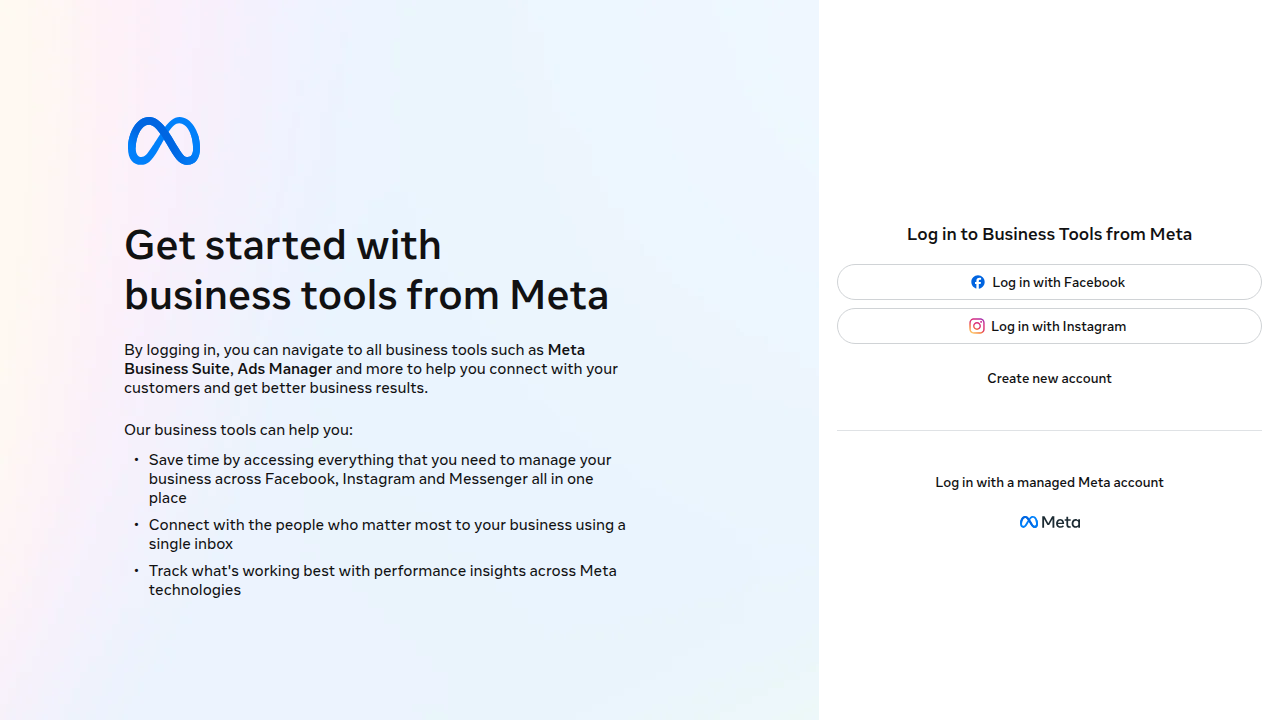
- What they are: These are messages the facebook messenger app sends out on its own, based on rules you set. You can set them up directly through Meta Business Suite [^1].
- Why they’re useful for appointment setters:
- Instant Replies: When someone messages you for the first time, an instant reply can greet them. It can say, "Thanks for reaching out! I’ll get back to you soon" or "Tell me more about what you’re looking for." This lets people know you’ve seen their message even if you’re busy [^5].
- Keyword-Based Replies: You can set up answers for specific words. If someone asks "What are your hours?", an automated reply can send your business hours. This helps answer common questions right away [^2].
- Qualifying Leads: You can use these to ask simple questions to learn more about a person. For example, "Are you looking for help with X or Y?" This helps you know if they’re a good fit before you even start talking personally [^6].
- Outside Business Hours: If someone messages you late at night, an automated message can tell them your office is closed and when you’ll reply [^5]. This means you never miss a chance to connect, even when you’re not online. You can even use simple tools to set up these replies without needing to be a tech expert [^4].
By using these features in the facebook messenger app, you’re not just chatting. You’re building a super-efficient system that helps you connect with more people, keep everything organized, and ultimately, set more appointments. It’s about working smarter, not harder, in your appointment setting career.
After you’ve got your facebook messenger app tools ready, the next big step is knowing what to say and how to say it. Your messages are how you connect with people and get them interested in booking a time with you. This isn’t just about sending texts; it’s about having good conversations that lead to appointments.
Talking to People: Your Outreach Plan
Think of your conversation as a journey. You want to guide someone from just learning about you to actually setting an appointment.
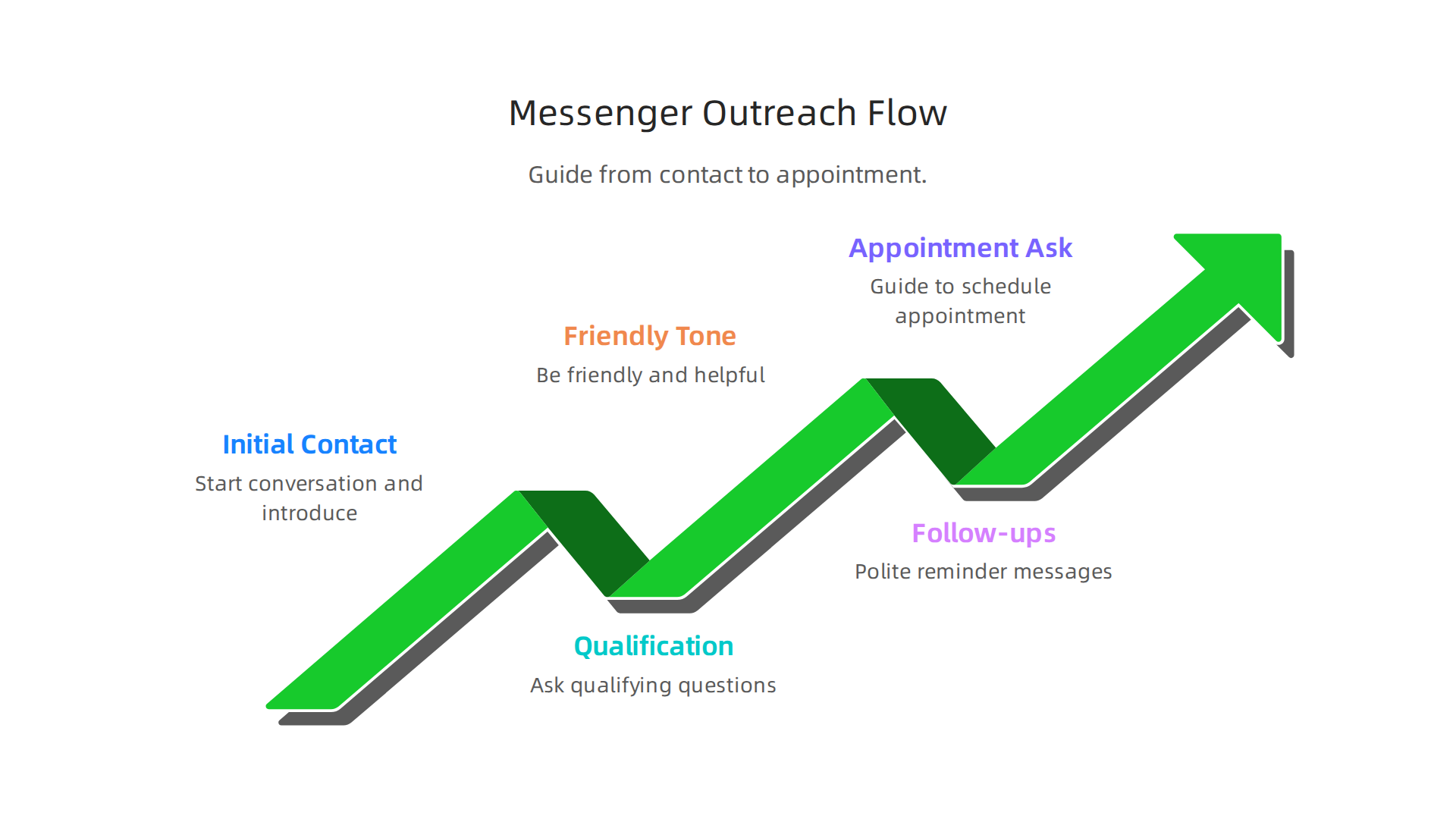

- Starting the Chat (Initial Contact): Your first message is like a friendly hello. Keep it short and clear. Tell them why you’re reaching out without being pushy. Personalizing your message for each person helps a lot [^21]. For example, "Hi [Name], I saw you were interested in [Topic] and thought I could help." Always aim for a helpful and human tone [^18].
- Asking Smart Questions (Qualification): Once they reply, you need to find out if they are a good fit for what you offer. This is called qualifying. Ask simple questions to learn about their needs. For example, "What are you hoping to achieve with [Service]?" or "Are you looking for help with X or Y?" This helps you know if you can truly assist them before moving forward [^19].
- Keeping in Touch (Follow-ups): Not everyone replies right away, and that’s okay. Sometimes, people are busy and just need a gentle reminder. Send a follow-up message a day or two later. Make it short and add value, like sharing a helpful tip related to what they might need. Don’t send too many messages too fast, or it might feel annoying.
What Your Messages Should Sound Like
Your tone matters. On the facebook messenger app, you want to be:
- Friendly and Approachable: Talk like a real person, not a robot. Use simple words.
- Helpful: Focus on how you can solve their problems or meet their needs.
- Clear: Make sure your messages are easy to understand. Avoid jargon.
- Polite: Always be respectful, even if someone isn’t interested.
Using saved messages, which we talked about before, can help you keep your tone consistent. However, remember to add a personal touch to each message. It makes a big difference [^21].
Playing by the Rules
When messaging people, especially for business, there are some rules to follow.
- Get Permission: It’s best practice to only message people who have shown interest or given you permission to contact them. This is sometimes called an "opt-in."
- Offer a Way Out: Always make it easy for someone to stop receiving messages from you. A simple "Reply STOP to unsubscribe" works. This shows respect for their choices.
- Follow Facebook’s Policies: Facebook has rules for how businesses use Messenger. Make sure your messages follow these guidelines to keep your account safe and working well [^6].
Making Your Messages Even Better with A/B Testing
How do you know which messages work best? You test them!
- What it is: A/B testing means you try out two slightly different versions of a message (Version A and Version B) with different people.
- Why it’s useful: You look to see which message gets more replies or leads to more appointments. Maybe one opening line works better than another, or a different way of asking a question. By testing, you learn what your audience likes and you can improve your messaging over time. This helps you get better at appointment setting. You can even manage these tests from your facebook app for pc to compare results easily.
After you’ve learned what to say and how to say it on the facebook messenger app, the next smart step is to connect your Messenger chats to other important tools you use. This is called integration. It helps you keep all your customer information in one place and makes your work much smoother. Think of it as making your different work tools talk to each other.
Connecting Messenger to CRM, Bots, and Lead Tracking
When you integrate the facebook messenger app with other systems, you create a powerful setup for managing your leads and appointments.
Here are some common ways businesses connect Messenger:
- Sending Info to Your CRM: A CRM (Customer Relationship Management) system is like a digital notebook for all your customer details. When someone messages you on the facebook messenger app, their contact info and what they said can automatically go into your CRM. This way, you don’t have to copy and paste details by hand. Tools like Zapier can help connect Facebook Messenger to many CRMs, even using smart AI to help organize the data [^2].

Some platforms are built to connect all messengers with popular CRMs such as Bitrix24 and Kommo [^1]. This creates context-rich notes about new leads or contacts from Messenger [^3].
- Using Bots for First Chats: Sometimes, a special computer program called a bot can talk to people first on the facebook messenger app. The bot can ask basic questions to understand what the person needs. This helps figure out if they are a good fit for your service before a real person takes over. Bots can help pre-qualify leads, saving you time.
- Connecting with Simple API Tools: An API is like a special key that lets two different apps share information. Many services have easy ways to connect to the facebook messenger app’s API. This allows you to set up automatic actions, like adding a new contact to a spreadsheet or sending a welcome email after a Messenger chat. Learning about the Facebook Messenger API can help you with these advanced connections in 2026 [^4].
Your Integration Checklist for Better Appointment Setting
To make sure your integrations work well, here’s a simple checklist:
- Map Your Information: Decide which pieces of information from a Messenger chat should go into your CRM. For example, the person’s name goes into the "Name" field, and their question goes into the "Notes" section.
- Track Conversation IDs: Each chat on the facebook messenger app has a unique ID number. Make sure your CRM or tracking system saves this ID. This way, you can easily find the original chat on Messenger if you need to look back at it.
- Sync Appointment Statuses: If you book an appointment in your CRM, it’s good for that information to be linked back to the Messenger conversation. This helps your team know the appointment is set and avoid sending more booking messages by mistake. Some CRM platforms specialize in strong Messenger integrations, helping you automate tasks and manage customer data efficiently [^5].
By connecting your facebook messenger app to these other tools, you make your whole appointment setting process much more efficient and organized.
After you’ve set up your Facebook Messenger app for appointment setting and connected it to your other tools, it’s super important to keep everything running smoothly. Sometimes, apps can have little hiccups. And when you work from home, it’s key to stay focused and organized. Let’s look at how to fix common issues and set up your work life for success in 2026.
Troubleshooting, performance tips, and remote-work setup for reliable messaging
It can be frustrating when the facebook messenger app isn’t working right, especially when you’re trying to set appointments. But most problems have simple fixes.

Fixing Common Messenger Problems
Here are some common issues and what you can do about them:
- Messages Not Sending or Connecting: If your messages aren’t going through or the app says "connecting," the first thing to check is your internet. Make sure your Wi-Fi or mobile data is turned on and working well [^youtube-gDqhl34kalQ, ^google-play-community]. Sometimes, simply turning your internet off and on again helps.
- App Crashing or Freezing: If the facebook messenger app keeps closing by itself or gets stuck, try these steps. First, close the app completely and open it again. If that doesn’t work, make sure your app is updated to the newest version. Old versions can have bugs [^androidpolice-facebook-messenger-not-working]. You can also try clearing the app’s "cache." This clears out temporary files that can sometimes cause issues [^google-play-community].
- Can’t Log In: If you’re having trouble signing into the facebook messenger app, double-check your username and password. If you forgot your password, use the "Forgot password" option. Also, ensure the Facebook servers aren’t down, though this is rare.
- When All Else Fails: If none of these work, you might need to uninstall the facebook messenger app and then download and install it again from your app store [^google-play-community]. This gives it a completely fresh start. For devices with less storage, sometimes using the "facebook lite" app can help with performance. It uses less data and space.
Setting Up for Productive Remote Work
Working remotely as an appointment setter means you need to be smart about your time and how you use the facebook messenger app.
- Manage Notifications: You don’t want constant pings bothering you all day. Go into the settings of your facebook messenger app and choose which notifications are important. Maybe you only want a sound for new messages from potential clients, not every reaction to an old chat. This helps you focus on appointment setting.
- Set Clear Work Times: Even when working from home, it’s good to have a clear start and end time. Stick to your schedule. This helps you stay focused during work hours and truly relax after. Success in appointment setting often comes from good time management [^superhumanprospecting-appointment-setting-tips].
- Handle Multiple Devices: You might use the facebook messenger app on your phone, tablet, or even a computer with the facebook app for pc. Decide which device is best for which task. For example, using the facebook app for pc for detailed chats or scheduling appointments can be easier with a bigger screen and keyboard. Make sure your account is logged in everywhere you need it and that all your chats sync.
- Set Boundaries: It’s easy for work and home life to blend when you work remotely. Try to have a separate workspace, even if it’s just a specific spot at your kitchen table. When your workday is done, try to mentally "switch off" from the facebook messenger app. This helps you avoid burnout and keeps you fresh for booking more appointments the next day. Being supported in your role means you can focus on making more appointments [^baoinc-b2b-tech-appointment-setting-2026].
Summary
This article explains how appointment setters can use the Facebook Messenger app and Messenger Lite in 2026 to reach more clients efficiently. It compares the full Messenger toolbox—rich media, video calls, and PC support—with the lightweight, data‑friendly Messenger Lite designed for older phones and slow connections. The guide covers why each option matters, how to choose the right app for different clients, and practical steps to set up accounts securely (verification, strong passwords, two‑factor authentication). You’ll learn how to build a professional profile, use saved messages, labels, and automated replies to speed outreach, and how to A/B test messaging for better response rates. It also shows how to integrate Messenger with CRMs, bots, and APIs so conversations become trackable leads, plus a simple integration checklist. Finally, the article reviews common troubleshooting fixes and remote‑work tips to keep your messaging reliable and productive.